
The Developer Environment
A professional developer environment is more than just a code editor and a terminal. It is a reproducible ecosystem that ensures the application behaves the same way on your laptop as it does in production. In full-stack development, where you manage multiple moving parts like databases, API servers, and frontend compilers, environmental consistency is the difference between a smooth release and the “it works on my machine” syndrome.
The principle of parity
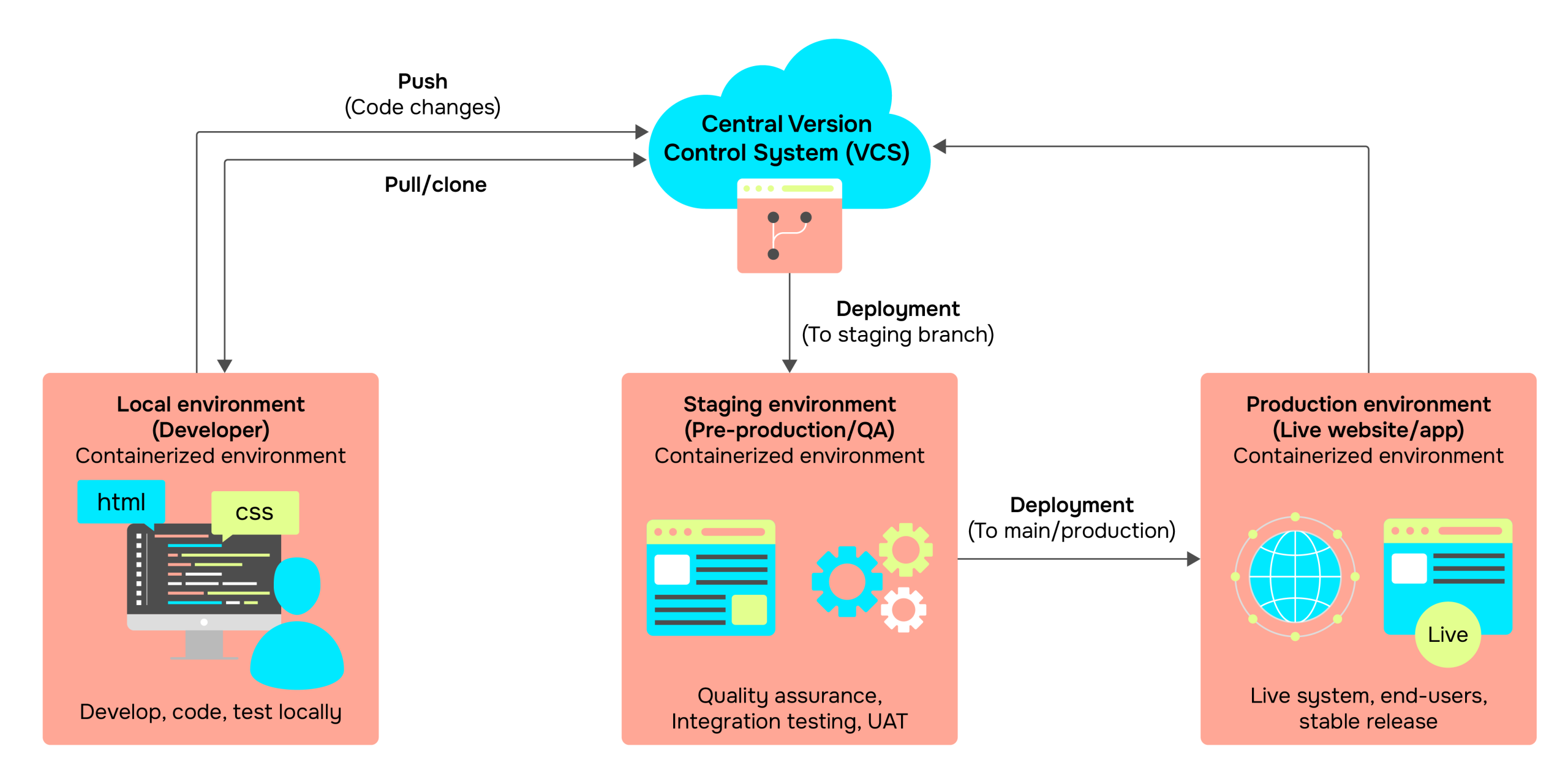
Environmental parity means keeping your local, staging, and production environments as similar as possible. If your production server uses Node.js v20 and PostgreSQL 15, your local machine should not be running Node v16 and PostgreSQL 12. Differences in minor versions can lead to subtle bugs in database drivers or asynchronous logic that are nearly impossible to debug once deployed.
To achieve this, we use version management tools:
- NVM (Node Version Manager): Allows you to switch between Node versions per project.
- Docker: Encapsulates your database and services in containers, ensuring the exact same binary runs regardless of your operating system.
- EditorConfig: A small file that enforces consistent indentation and line endings across different IDEs like VS Code or IntelliJ.
Containerization with Docker
For a full-stack project, the database should never be installed “bare metal” on your operating system. Instead, use Docker Compose. This allows you to define your entire infrastructure in a single YAML file. With one command, you can spin up a database, a cache layer, and a mail server without cluttering your global system paths.
The benefit of this approach is portability. If a new developer joins your project, they do not need to spend hours installing dependencies. They simply run the container orchestration, and the environment is ready.
Secrets management and .env files
Full-stack applications require sensitive keys, such as database passwords, API secret keys, and Stripe tokens. These must never be hardcoded or committed to version control like Git.
Instead, we use an .env file. This file stays on your local machine and is ignored by Git using a .gitignore file. In production, these variables are injected through the hosting provider’s dashboard. A common best practice is to provide a .env.example file in your repository, which contains the keys but not the actual secret values, serving as a template for other contributors.
Linting and formatting as a guardrail
Code quality should be automated, not negotiated. In a full-stack system, you likely have different languages and styles in the same repository.
- ESLint: Analyzes your code for potential errors, such as unused variables or incorrect asynchronous handling.
- Prettier: Handles the visual formatting, ensuring that every file follows the same spacing and bracket rules.
By integrating these into your environment, you eliminate “nitpick” comments during code reviews and focus on the actual architectural logic.
Learning point: Set up “Format on Save” in your editor. This tiny workflow change ensures that every line of code committed is clean, reducing the noise in your Git history.
The API testing environment
In the first chapter, we discussed the API as a contract. To verify this contract locally, you need a way to interact with your backend without using the frontend. Tools like Postman, Insomnia, or the REST Client extension for VS Code allow you to:
- Trigger API endpoints manually.
- Save collections of requests for different features.
- Test how the server responds to edge cases, such as sending an empty string or an unauthorized token.
Automating the workflow with scripts
A professional environment uses a package.json (for Node projects) to script common tasks. Instead of remembering long terminal commands, you create aliases. This reduces the mental load and makes the development process repeatable.
					/**
 * Example of a professional package.json script section.
 * These scripts coordinate the frontend and backend simultaneously.
 */
{
  "scripts": {
    // Starts the backend server with hot-reloading
    "dev:server": "nodemon src/server.js",

    // Starts the frontend development server
    "dev:client": "vite",

    // Uses 'concurrently' to run both with a single command
    "dev": "concurrently \"npm run dev:server\" \"npm run dev:client\"",

    // Runs linting checks across the whole project
    "lint": "eslint . --ext .js,.jsx,.ts,.tsx",

    // Orchestrates the database setup via Docker
    "db:up": "docker-compose up -d",

    // Standardized test suite execution
    "test": "jest --watchAll"
  }
}
Note: If your project grows, consider using a Monorepo tool like TurboRepo or Nx. These tools optimize the developer environment by caching build results, so you only re-compile the parts of the app that have actually changed.
Git workflow and branching
The final piece of the environment is how you manage changes. A full-stack engineer never works directly on the “main” branch. Instead, use a Feature Branch workflow:
- Main: The production-ready code.
- Develop: The integration branch for new features.
- Feature/xxx: Short-lived branches for specific tasks (e.g.,
feature/user-auth).
This structure allows you to experiment freely without breaking the “stable” version of your system. It also provides a clear history of why certain architectural decisions were made through pull request discussions.
The local machine has evolved from a simple workspace into a mirrored version of a professional production server. It is now a controlled environment, equipped with the tools, secrets management, and automation necessary to build and validate software at scale.
Popular Guides